Showing posts with label brainstorming. Show all posts
Showing posts with label brainstorming. Show all posts
Friday, November 5, 2010


Friday, October 15, 2010
Improving three elements involved in the learning process of a language by using tools designed for Second Life (SL Languages 2010)
From today SL Languages 2010 begins at Second Life. We encourage you to take a look into the schedule SL Languages Schedule.
Saturday 16 October 2010. 7am PDT (SL Time)/2pm GMT / 10pm CST (China Standard Time)
(See in this link (The Fixed Time World Clock) what is the time of the presentation, depending on where you are.)
In the parallel session 5.1. Parallel session 5.1 Akemi Mochizuki (Draceina Pinion avatar)and me will present:
"Improving three elements involved in the learning process of a language by using tools designed for Second Life. Grammar, Vocabulary and Use in context: Word Puzzle Ball, Dracy Crossword (type 5 and Making Panel) and Brainflowing"
Abatract
Second Life is an adequate environment for learning languages not just because allows to join individuals from several places, facilitating the exchange of ideas between them but also because of the immersive character of this virtual environment, which permits people to share a common space where they can interact with ease and where they feel comfortable. Even without the need of using tools, Second Life, understood as an space is a very adequate place for practicing languages but it is mainstream taking advantage of the easiness that we experiment in this Virtual World for designing and creating intelligent tools oriented to achieve specific objectives involved in the process of learning a language. Therefore, in this demonstration, we will introduce tools focused on practicing three main issues that take part in the learning process of a language:
Word Puzzle Balls and Dracy Crossword (type 5 and Making Panel) are created by Draceina Pinion and aim to help people to improve grammar and vocabulary in many languages. Thus, Word Puzzle Balls can be used for learning and teaching the grammar of all the languages which can be used in Second Life and Dracy Crossword can be applied for learning and teaching vocabulary of English, German, Spanish, French, Italian and Hirigana, the first of all the writing systems taught to Japanese children. Brainflowing, created by gloriagdiagoGalicia and Draceina Pinion is a tool intended on facilitating the brainstorming activity in Second Life. It permits to brainstorm, by using several languages, being very adequate for practicing a language in context. Furthermore, because permits people to brainstorm by anonymity, the learners, will be not afraid of committing mistakes when writing and the teacher could correct them without referring to the persons who have done.
This session lasts for 120 minutes and takes place in AVALON Learning Sandbox
VENUE: AVALON Learning Sandbox
http://maps.secondlife.com/secondlife/AVALON%20Learning/101/65/36
Note: all the tools are available in Dracy´s virtual shop, at Second Life.
http://maps.secondlife.com/secondlife/Zerelia/233/98/74
Saturday 16 October 2010. 7am PDT (SL Time)/2pm GMT / 10pm CST (China Standard Time)
(See in this link (The Fixed Time World Clock) what is the time of the presentation, depending on where you are.)
In the parallel session 5.1. Parallel session 5.1 Akemi Mochizuki (Draceina Pinion avatar)and me will present:
"Improving three elements involved in the learning process of a language by using tools designed for Second Life. Grammar, Vocabulary and Use in context: Word Puzzle Ball, Dracy Crossword (type 5 and Making Panel) and Brainflowing"
Abatract
Second Life is an adequate environment for learning languages not just because allows to join individuals from several places, facilitating the exchange of ideas between them but also because of the immersive character of this virtual environment, which permits people to share a common space where they can interact with ease and where they feel comfortable. Even without the need of using tools, Second Life, understood as an space is a very adequate place for practicing languages but it is mainstream taking advantage of the easiness that we experiment in this Virtual World for designing and creating intelligent tools oriented to achieve specific objectives involved in the process of learning a language. Therefore, in this demonstration, we will introduce tools focused on practicing three main issues that take part in the learning process of a language:
Word Puzzle Balls and Dracy Crossword (type 5 and Making Panel) are created by Draceina Pinion and aim to help people to improve grammar and vocabulary in many languages. Thus, Word Puzzle Balls can be used for learning and teaching the grammar of all the languages which can be used in Second Life and Dracy Crossword can be applied for learning and teaching vocabulary of English, German, Spanish, French, Italian and Hirigana, the first of all the writing systems taught to Japanese children. Brainflowing, created by gloriagdiagoGalicia and Draceina Pinion is a tool intended on facilitating the brainstorming activity in Second Life. It permits to brainstorm, by using several languages, being very adequate for practicing a language in context. Furthermore, because permits people to brainstorm by anonymity, the learners, will be not afraid of committing mistakes when writing and the teacher could correct them without referring to the persons who have done.
This session lasts for 120 minutes and takes place in AVALON Learning Sandbox
VENUE: AVALON Learning Sandbox
http://maps.secondlife.com/secondlife/AVALON%20Learning/101/65/36
Note: all the tools are available in Dracy´s virtual shop, at Second Life.
http://maps.secondlife.com/secondlife/Zerelia/233/98/74
Outcomes obtained after brainstorming at ISTE by using Brainflowing
Note: photos taken by Akemi Mochizuki (Draceina Pinion avatar)


Yesterday, Akemi Mochizuki (Draceina Pinion avatar) and me enjoyed a very nice time presenting and using Brainflowing at ISTE. We thank all of them for their collaboration and engagement and we also thank to Terra Sieberman (Louise Borgnine avatar), who is Membership Development at ISTE (International Society for Technology in Education)
Brainstorming about advantages of Second Life
Participants identified, among others, the following ones:
- global connections,
- collaboration personal
- learning network
- professional opportunities
- meeting people
- Kurka-licious fun
- collaboration
- personal learning network
- professional opportunities
- museums
- art shows
- beauty
- imagination
- creativity
Brainstorming about alternatives to Second Life.
All Participants agree about the bad consequences that the elimantion of spetial prices for educational and non profit places in Second Life not just for these Institutions but also for the users who were atteding the events they organize. We were sharing about the best alternatives to this Virtual World and the following virtual environments were cited:
- Reaction Grid
Based on Unity3D combined with custom software and inworld scripting it is quickly
becoming a hit for high concurrency-easy to login to use cases. System
Architecture PDF. Highlights:Cross Platform Windows & Mac, Browser plugin, Game
Console Ready Iphone/Ipad/Ipod Touch capable, Android Ready, Standard 3D Mesh/CAD
Import, C#/Javascript/Boo Inworld Scripting, Concurrency to 1000+ Per Level, Vivox
Voice
Opensimulator is open source software that is a favorite for educational users on ReactionGrid.
GaiaOnline
World of Warcraft
Blue mars
The Blue Mars Virtual World Platform is made up
of the Blue Mars Client, the Blue Mars Sandbox Editors, BlueMars.com, and the Blue
Mars Servers.
Eve Online
- Wonderland
Open Cobalt Alpha
Open Cobalt Alpha is the first step in a long term
project to make available to all people a free and open source platform for
constructing, accessing, and sharing virtual workspaces for research and
education. This 3D multimedia wiki technology makes it easy to create deeply
collaborative and hyperlinked multi-user virtual workspaces, virtual exhibit
spaces, and game-based learning and training environments that run on all major
software operating systems. By using a peer based messaging protocol to reduce
reliance on server infrastructures for support of basic in world interactions
across many participants, Open Cobalt makes it possible for people hyperlink their
virtual worlds via 3D portals to form a large distributed network of
interconnected collaboration spaces. It also makes it possible for schools and
other organizations to freely set up their own networks of public and private 3D
virtual workspaces that feature integrated web browsing, voice chat, text chat,
and access to remote desktop applications and services.
Croquet
Croquet is a powerful open source software
technology that, in the form of the Croquet Software Developer's Kit (Croquet
SDK), can be used by experienced software developers to create and deploy deeply
collaborative multi-user online virtual world applications on and across multiple
operating systems and devices. Derived from Squeak, the Croquet system features a
peer-based messaging protocol that dramatically reduces the need for server
infrastructures to support virtual world deployment and makes it easy for software
developers to create deeply collaborative applications. Cobalt is a National
Science Foundation-sponsored effort to develop an open source virtual world
browser and authoring toolkit application based on the Croquet technology.
Science Sim
The 3D Internet refers to a currently disparate
but rapidly converging set of 3D technologies used for visualizing 3D information
on the web. This convergence promises to provide a new set of collaborative tools
with application in collaborative visualization, education, training and scientific
discovery. As part of the Supercomputing Conference this year working with
supporters in the community we have made available a virtual world based on the
open source package OpenSim
Jokaydia
The Islands of jokaydia Project is facilitated by
Jo Kay aka jokay Wollongong. It was launched in September 2007 and aims to provide
a space to explore the uses of virtual worlds in education, the arts and social
change. We are a community of practice, and have homes in various virtual worlds
including our very own jokaydiaGRID running on Opensimulator, along with presence
in Second Life, Jibe and Reaction Grid. We are also exploring BlueMars, World of
Warcraft, Aion and a number of other virtual worlds and gaming platforms.
3rd Rock Grid
Within the virtual world you will find houses,
businesses, music clubs, role playing areas, parks, museums, whatever the community
decides to build or develop, either collectively on community property or
individually on your own property. You will also meet and talk to other
individuals, Americans, Canadians, Australians, Europeans, and others from all
corners of the globe.You are represented by a three dimensional “avatar” that you
control , you control the looks, the clothes, and its movement throughout the
virtual world. The possibilities are endless and completely up to you - the
creator! You will find individuals from 18 to 70 and beyond in world, it is not a
predetermined game, with your interaction with the other individuals your world
becomes what you make it.
SpotOn3d
potON3D's ™ 3DWeb Systems empower Internet users to break out of the flat 2D web
page, and GO TO A PLACE on the web – 3DWeb Worlds - where they can experience much
of the same functionality & experience they enjoy in the real world without having
to spend the time or money get to there.
Participants also pointed the fact that there is an HyperGate, teleporter system between worlds which permits to walk to one place to another.Other issue that was pointed out is that OpenSim is much less expensive in comparision with Second Life and in some ways much easier to change.


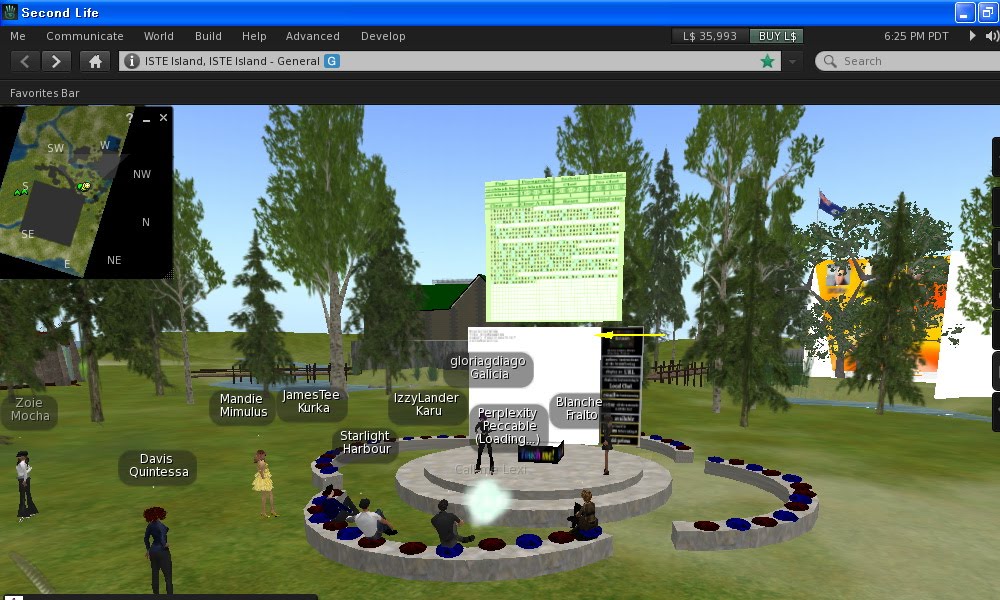
Yesterday, Akemi Mochizuki (Draceina Pinion avatar) and me enjoyed a very nice time presenting and using Brainflowing at ISTE. We thank all of them for their collaboration and engagement and we also thank to Terra Sieberman (Louise Borgnine avatar), who is Membership Development at ISTE (International Society for Technology in Education)
Brainstorming about advantages of Second Life
Participants identified, among others, the following ones:
- global connections,
- collaboration personal
- learning network
- professional opportunities
- meeting people
- Kurka-licious fun
- collaboration
- personal learning network
- professional opportunities
- museums
- art shows
- beauty
- imagination
- creativity
Brainstorming about alternatives to Second Life.
All Participants agree about the bad consequences that the elimantion of spetial prices for educational and non profit places in Second Life not just for these Institutions but also for the users who were atteding the events they organize. We were sharing about the best alternatives to this Virtual World and the following virtual environments were cited:
- Reaction Grid
Based on Unity3D combined with custom software and inworld scripting it is quickly
becoming a hit for high concurrency-easy to login to use cases. System
Architecture PDF. Highlights:Cross Platform Windows & Mac, Browser plugin, Game
Console Ready Iphone/Ipad/Ipod Touch capable, Android Ready, Standard 3D Mesh/CAD
Import, C#/Javascript/Boo Inworld Scripting, Concurrency to 1000+ Per Level, Vivox
Voice
Opensimulator is open source software that is a favorite for educational users on ReactionGrid.
GaiaOnline
World of Warcraft
Blue mars
The Blue Mars Virtual World Platform is made up
of the Blue Mars Client, the Blue Mars Sandbox Editors, BlueMars.com, and the Blue
Mars Servers.
Eve Online
- Wonderland
Open Cobalt Alpha
Open Cobalt Alpha is the first step in a long term
project to make available to all people a free and open source platform for
constructing, accessing, and sharing virtual workspaces for research and
education. This 3D multimedia wiki technology makes it easy to create deeply
collaborative and hyperlinked multi-user virtual workspaces, virtual exhibit
spaces, and game-based learning and training environments that run on all major
software operating systems. By using a peer based messaging protocol to reduce
reliance on server infrastructures for support of basic in world interactions
across many participants, Open Cobalt makes it possible for people hyperlink their
virtual worlds via 3D portals to form a large distributed network of
interconnected collaboration spaces. It also makes it possible for schools and
other organizations to freely set up their own networks of public and private 3D
virtual workspaces that feature integrated web browsing, voice chat, text chat,
and access to remote desktop applications and services.
Croquet
Croquet is a powerful open source software
technology that, in the form of the Croquet Software Developer's Kit (Croquet
SDK), can be used by experienced software developers to create and deploy deeply
collaborative multi-user online virtual world applications on and across multiple
operating systems and devices. Derived from Squeak, the Croquet system features a
peer-based messaging protocol that dramatically reduces the need for server
infrastructures to support virtual world deployment and makes it easy for software
developers to create deeply collaborative applications. Cobalt is a National
Science Foundation-sponsored effort to develop an open source virtual world
browser and authoring toolkit application based on the Croquet technology.
Science Sim
The 3D Internet refers to a currently disparate
but rapidly converging set of 3D technologies used for visualizing 3D information
on the web. This convergence promises to provide a new set of collaborative tools
with application in collaborative visualization, education, training and scientific
discovery. As part of the Supercomputing Conference this year working with
supporters in the community we have made available a virtual world based on the
open source package OpenSim
Jokaydia
The Islands of jokaydia Project is facilitated by
Jo Kay aka jokay Wollongong. It was launched in September 2007 and aims to provide
a space to explore the uses of virtual worlds in education, the arts and social
change. We are a community of practice, and have homes in various virtual worlds
including our very own jokaydiaGRID running on Opensimulator, along with presence
in Second Life, Jibe and Reaction Grid. We are also exploring BlueMars, World of
Warcraft, Aion and a number of other virtual worlds and gaming platforms.
3rd Rock Grid
Within the virtual world you will find houses,
businesses, music clubs, role playing areas, parks, museums, whatever the community
decides to build or develop, either collectively on community property or
individually on your own property. You will also meet and talk to other
individuals, Americans, Canadians, Australians, Europeans, and others from all
corners of the globe.You are represented by a three dimensional “avatar” that you
control , you control the looks, the clothes, and its movement throughout the
virtual world. The possibilities are endless and completely up to you - the
creator! You will find individuals from 18 to 70 and beyond in world, it is not a
predetermined game, with your interaction with the other individuals your world
becomes what you make it.
SpotOn3d
potON3D's ™ 3DWeb Systems empower Internet users to break out of the flat 2D web
page, and GO TO A PLACE on the web – 3DWeb Worlds - where they can experience much
of the same functionality & experience they enjoy in the real world without having
to spend the time or money get to there.
Participants also pointed the fact that there is an HyperGate, teleporter system between worlds which permits to walk to one place to another.Other issue that was pointed out is that OpenSim is much less expensive in comparision with Second Life and in some ways much easier to change.
Thursday, October 14, 2010
Brainstorming with Brainflowing at ISTE (strengths of Second Life and current alternatives to this Virtual Environment)
Thursday, October 14, 2010, 6-7 PM SLT (that's 9PM EST)
ISTE (International Society for Technology in Education) Educators Social Events at Second Life
Facilitator: gloriadiago Galicia & Draceina Pinion
Location: ISTE Island Campfires http://slurl.com/secondlife/ISTE%20Island/182/91/23
Gloria Gómez-Diago (gloriagdiagoGalicia SL) and Akemi Mochizuki (Draceina Pinion SL) will introduce Brainflowing, a device for brainstorming in Second Life, and for transferring the outcomes generated to other contexts. After explaining how the tool works, two brainstorming will be held with all the participants. First we will be focused on identifying tasks which can be undertaken in this Virtual World for achieving objectives involved in a teaching/ learning process. Then, taking in mind the removal of the educational/non-profit discount in Second Life_ issue considered worthy of attention_ we will brainstorm about the current alternatives to this Virtual Environment. Therefore, by sharing experiences about the use of other platforms, we will to seek their salient advantages and failures.
Brainflowing has a symbolic price of 1000 linden Dollars, which are equivalent to $3.64, £2.34 or €2.76, and it is available at Dracy´s Virtual Shop.
http://slurl.com/secondlife/Zerelia/240/105/74
NOTE: Take note of the time of the event depending on your localization by seeing "Worldwide GMT Fixed Time"
ISTE (International Society for Technology in Education) Educators Social Events at Second Life
Facilitator: gloriadiago Galicia & Draceina Pinion
Location: ISTE Island Campfires http://slurl.com/secondlife/ISTE%20Island/182/91/23
Gloria Gómez-Diago (gloriagdiagoGalicia SL) and Akemi Mochizuki (Draceina Pinion SL) will introduce Brainflowing, a device for brainstorming in Second Life, and for transferring the outcomes generated to other contexts. After explaining how the tool works, two brainstorming will be held with all the participants. First we will be focused on identifying tasks which can be undertaken in this Virtual World for achieving objectives involved in a teaching/ learning process. Then, taking in mind the removal of the educational/non-profit discount in Second Life_ issue considered worthy of attention_ we will brainstorm about the current alternatives to this Virtual Environment. Therefore, by sharing experiences about the use of other platforms, we will to seek their salient advantages and failures.
Brainflowing has a symbolic price of 1000 linden Dollars, which are equivalent to $3.64, £2.34 or €2.76, and it is available at Dracy´s Virtual Shop.
http://slurl.com/secondlife/Zerelia/240/105/74
NOTE: Take note of the time of the event depending on your localization by seeing "Worldwide GMT Fixed Time"
Wednesday, August 4, 2010
Tuesday, June 29, 2010
Select the type of brainstorming you want to perform in Second Life by using Brainflowing.


Select the type of brainstorming you want to perform in Second Life by using Brainflowing.
Brainflowing has been updated, by including a menu that permits choosing the type of brainstorming we want to perform depending on the number of prims we have available in the land where we develop the activity and. Now users can decide the prims they will use with the tool, taking in mind the prims that they have available in their land or in the land where they use the tool. Thus, person who will conduct the brainstorming, after selecting in the menu the number of prims he or she is interested on using, must indicate to participants how many words they can use for giving utterance to their ideas in the board.
This menu that was incorporated to Brainflowing helps users to understand easily the relation between the number of words we use during the brainstorming activity and the prims we need to have available in the land where the activity takes place.
Though people have prims enough in their land, they can select an option with few prims in order to make participants to express their ideas in few words. This is highly recommended once time we have shared general ideas about the topic we are discussing and we want to polish them.
Finally, we want to point that, by using the option that will allow us to choose the number of prims that will be used in the tool, we can select the 0 prims option. Selecting this option is very adequate if we want to have our Brainflowing displayed in our land but we want people not to drag notecards on it.
By contrary, if we are interested in that people drag notecards into the board, we must select the number of prims that will permit them doing it.
Apart from this new feature, now Brainflowing display more quickly the notecards that users drag into it. Notecards are displayed on the board just instantaneously. Last but not least, in order to facilitate the management of the tool, in these new version the buttoms of the options that can be used by the owner of the tool are highlighted in yellow. ("email the brainstorming", "save your board in a prim before taking it", "add prims")
Enjoy it and take advantage of the characteristics of Second Life environment for brainstorming. Brainflowing is available here
Bibliography for guessing possible uses of Brainflowing.
Herver, G., El Kamel, L. and Rigaux-Bricmont, B. (2010) Entretien de groupe dans Second Life, Recherches Qualitative , edited by the Association pour la Recherche Qualitative (ARQ), Quebec, Canada.Vol. 29, number, 1, Spring, “Entretiens de Groupe: Concepts, Usages et Ancrages” Coordinated by: François Guillemette, Jason Luckerhoff et Colette Baribeaue.
Videos about the tool.
Draceina Pinion made this video about one of the first versions of Brainflowing.
Tuesday, March 30, 2010

Tuesday, March 23, 2010
Update of Brainflowing (two new features related to the use of language)


After its presentation at Virtual Worlds Best Practices Conference (March, 13, 2010) , Brainflowing have been updated. Thus, to the main 5 functions that Brainflowing had, two more have been just added.
Both are related with the use of language. One makes possible writing properly and accurately in the board (words will be not separated, will be displayed smartly, depending on the free space available in the board) and the other, allows us to use the Brainflowing for brainstorming in six different languages: English, French, German, Italian, Japanese and Spanish. (You can see on the image created by Draceina Pinion some of the characters that you can use by brainstorming with Brainflowing)
Until now brainflowing was thought for brainstorming in English but we have integrated the suggestions from people who bought it and now Brainflowing has incorporated the philosophy of Second Life: many languages and cultures sharing the same space.
Brainflowing allows us to
1, Display on it the words provided by participants.
2, Send by email the text displayed on the board.
3, Show URLS for encouraging or managing participants
4, Display on the local chat the brainstorming done. Then, the ideas proposed by participants can be copied and pasted into a notecard or just for remembering the contents proposed by participants.
5, Brainstorm by anonymity. This means that participants will not know who is the author of each one of the sentences, words, ideas showed in the board. This function was added taking into consideration the common resistance that we have for expressing what we think because we are shy, because we are not sure about our ideas or because we do not want to put other angry.
6. Displaying the words in a smart way.
That means that words are not separated, avoiding possible errors in the interpretation or reading of the ideas presented. Thus, Brainflowing have being
improved for displaying the words together, adapting to the space that is free in
Brainflowing.
7.Apart from English, you can now brainstorming in French, German, Italian, Japanese and Spanish.
Then.....Ready to brainflow?
For getting it, you must visit the comfortable shop of Draceina Pinion in Second Life. Virtual Dracy´s shop. (You will find other useful tools there )
http://slurl.com/secondlife/Zerelia/240/105/74
Note: update of Brainflowing will be sent, in some days, by free to the people who has bought it.
Video made by Draceina Pinion about new features of Brainflowing (she explains them by voice)
Saturday, March 13, 2010


Thursday, March 11, 2010
Presentation of Brainflowing at Virtual Worlds Best Practices in Education, March, 13, 2010

Virtual Worlds Best Practices in Education. 3RD Annual Conference March, 12-13, 2010.
Saturday March, 13, 2010 VWBPE SOUTH
Tutorials/Tools and Products
Draft of the Schedule-
Brainflowing´s presentation:
Day: Saturday, 13 March, 2010.
Time: 03:00 SL (12.00, Spain)
Place: VWBPE South 4 (169, 126, 24)
http://slurl.com/secondlife/VWBPE%20South%204/169/126/24
Link to the place for the presentation(until Sunday, you can try a demo of Brainflowing there)and there also more educational tools displayed, created by Draceina Pinion
Description of the Brainflowing
Virtual Worlds are frequently used for brainstorming. Collaborating as an Avatar in a virtual space gives us a sense of "presence," that enhances our ability to work together and focus on the brainstorming process. There are a number of tools that have been developed to help brainstorm in Second Life. Brainflowing is a new, a different brainstorming tool, created by Gloria Gómez-Diago (gloriagdiagoGalicia avatar) and Akemi Mochizuki (Draceina Pinion avatar) to make it easy to brainstorm new ideas and to transfer the results to Real Life.
The focal point of the Brainflowing is a display board, where text written by participants is displayed. To make it easy to share and use ideas outside of Second Life, the system can send the brainstorming information collected via email. Brainstorming data is also displayed and easily copied from local chat. Furthermore, The Brainflowing can display URLs, making it easy to share relevant web content which can be used for conducting or for encouraging participants.
Brainflowing takes advantage of Second Life in order to achieve things that we cannot obtain in real life. There is a common resistance to express what we think. Thus, by using this tool, participants can brainstorm by anonymity. This means that people can brainstorm freely without fear of annoying others, without fear of ridicule, etc. Usually people avoid saying what they think because they don’t want to get others angry, because they are shy or because they feel not sure about what they think. Brainstorming by anonymity enhances the feeling of belonging to a collective purpose, an exchanging of ideas made to achieve a previously defined collective objective.
You can buy Brainflowing at Dracy´s Virtual Shop
Saturday, January 30, 2010
Brainflowing


Doing Brainstorming is one of the applications of Virtual Worlds. The feeling of presence that we can have thanks to be into our avatars, make it possible to be focused on the realization of a brainstorming. Thanks to be located in a space, which we share we others, we feel we are taking part in a common activity.
There are some tools that help us to brainstorm in Second Life.
Brainflowing has been created after studying some of those tools. Draceina Pinion (S.L name) and me have designed and created this tool trying to incorporate into it several functions that will help you to brainstorm in Second Life and to take advantage of the brainstorming you do in this Virtual World, for applying the ideas and discussions generated into Real Life.
Brainflowing, consists on a board where the text wrote by participants will be displayed. Because we were interested on can people can transfer the brainstorming to real life, we have added one option that allows sending the brainstorming by email. Furthermore, we can also display the brainstorming in the local chat. In this way, people can copy and paste in a document.
We also considered that when we organize a brainstorming sometimes is needed to show elements, ideas or images for motivating the participation or even for conducting it. Thus, Brainflowing has an option for displaying URLS where we can previously publish some appointments for managing the brainstorming.
Brainflowing takes advantage of Second Life in order to achieve things that we cannot obtain in real life. There is a common resistance to express what we think. Thus, by using this tool, participants can brainstorm by anonymity. This means that people can brainstorm freely without fear of annoying others, without fear of ridicule, etc. Usually people avoid saying what they think because they don’t want to get others angry, because they are shy or because they feel not sure about what they think. Brainstorming by anonymity enhances the feeling of belonging to a collective purpose, an exchanging of ideas made to achieve a previously defined collective objective.
Brainflowing has a symbolic price of 2000 linden Dollars, which are equivalent to $5.28, £4.68 or €5.52, and it is available in Dracy´s Virtual Shop, http://maps.secondlife.com/secondlife/Zerelia/227/99/74
Clik here for arriving to the place where you can find the Brainflowing
Further readings
Updates of the device
Update of braindlowing. Two new features related with the use of the language
Update June 2010. Select the type of Brainstorming you want to perform in Second Life, by using Brainflowing
Events
Presentation of Brainflowing at Virtual Worlds Best Practices in Education, March, 2010
Brainflowing at ISTE. (October 2010)
pictures of presentation of Brainflowing at ISTE (October 2010), taken by rosefirerising
Brainflowing at SL Languages 2010. (October, 2010)
SLlanguages (videos of presentations)
Videos
Video about Brainflowing (made by Draceina Pinion)
Bibliography related to brainstorming at Virtual Environments
Entretien de groupe dans Second Life, by Guillaume Hervet, Leila El Kamel and
Benny Rigaux-Bricmont. RECHERCHES QUALITATIVES – Vol. 29(1), 2010, pp. 69-98.
Gómez-Diago, G. (2010), ‘Brainflowing, virtual/physical space and the flow of
communication: An explanatory approach to the metaverse through a tool designed for brainstorming’, Metaverse Creativity,1:1, pp. 49–65, ISSN: 20403550,
Testimonials of users of Brainflowing (December, 28, 2010)
Multiracial communities and the virtual world: Second Life as educational site of engagement?, by Dean Anthony Fabi Gui
Sunday, August 2, 2009
Saturday, February 14, 2009
Workshop in Muvenation (How to add an url to an object)

I have enjoyed a lot My first time as SL Instructor.
The workshop´s objetives were to made a brainstorming about possible uses of adding urls to an objects in S.L. and, before, learn how to do that.
We use the Brain Board V4.0 tool in order to do the brainstorming. (You can get this tool here and a more free educational tools).
Brain Board allows us to see all the ideas that we are going to purpose during the brainstorming. The tool is very interesting and because of that, we made too a brainstorming about possible uses of the tool. I am very happy because all students participated in the discuccion, giving ideas and exchanging opinions.
I was very worry because only two students were on the list but more students join in the workshop at the end. I am very grateful to Marga for purposing me to get the Brain Board 4.0.
Subscribe to:
Posts (Atom)


